Why your presentation design matters more than you think
What research says about slide design: how decks get read, why words plus pictures work, why slide titles matter and why shorter decks win more deals.

Most teams treat slide design as packaging. The strategy gets weeks, the numbers get days, and the slides get whatever time is left the night before. It is easy to see why. Design feels like the last coat of paint, the part you add once the real work is done.
The research says otherwise. Over the last few decades, psychologists, learning researchers and the companies that track how decks are actually used have measured what happens when people look at slides. Their findings are consistent: how a deck is designed changes whether people read it, whether they understand it, whether they remember it and whether they trust the company behind it. Design is not the paint. It is how the message gets into someone else’s head.
We first wrote this post in 2025 as an opinion piece. In October 2026 we rewrote it around the evidence. Below is what the studies show, where they are strong and where they are thin, and what to change in your next presentation because of them. We have tried to be careful with every number, because presentation advice is full of statistics that nobody can trace back to a study.
Most slides break the same few rules
The most direct look at everyday slides comes from a 2012 paper by Stephen Kosslyn and colleagues, “PowerPoint Presentation Flaws and Failures: A Psychological Analysis.” The researchers collected 140 real slideshows from research, education, government and business, and checked each one against rules drawn from how human perception and memory work.
The problems were everywhere. In 91% of the slideshows, at least one list had more than four bullet points. In 91%, bullets ran longer than two lines. And the fields were no different from each other: academic slideshows were no better or worse than business ones. When the same team surveyed 205 people who watch presentations regularly, the complaint that was both the most common and the most annoying was simple: the main point was buried under lots of irrelevant detail.
The third part of the study is the one that matters most for anyone building a deck. When people were shown slides that broke a rule, they often didn’t notice. Even when they did, they often couldn’t say what was wrong. The authors’ conclusion is worth keeping in mind: the principles of good slide design are “neither obvious nor necessarily intuitive.” In plain words, you cannot rely on a slide feeling fine. Something can look acceptable to the person who made it and still lose the audience.
That is the honest case for treating design as a skill. The sections below go through the specific findings, one by one.
Your deck is often read without you
Many decks are read, not presented. A buyer forwards your slides to a colleague who wasn’t on the call. An investor opens your link between two meetings. Nobody is there to explain what a slide means or which number matters.
This is now how most business buying works. In a Gartner survey of 632 B2B buyers, 61% said they prefer a buying experience without a sales rep. They research on their own, and your deck is one of the things they research with.
Investors read fast. DocSend, which tracks how decks are opened and read, found that investors spend an average of 3 minutes and 44 seconds reviewing a seed pitch deck, and that only 58% of decks are read to the end. DocSend recommends a deck of 19 to 20 pages. Put those numbers together and each slide gets about eleven seconds. Nearly half the time, the last slides never get seen at all.
Eleven seconds is enough to read a sentence and glance at a chart. It is not enough to work through six bullets and a table. A slide built to be talked over, with the real point living in the presenter’s head, simply doesn’t work when the presenter isn’t there.
What to do: read your deck with the sound off, as if someone forwarded it to you. If a slide only makes sense when someone explains it, rewrite its title so the point is stated, or split it into two slides. Put the slides that matter most early, because the reader may not reach the end.
People understand more when words and pictures work together
Learning researchers have tested slide-like material, short text paired with pictures, for decades, much of it built on Richard Mayer’s work on multimedia learning. In 2025, Jennifer Cromley and Runzhi Chen published a meta-analysis of that research: 92 articles, 181 studies and 591 separate results, pulled together to see which findings hold up.
Two of their findings matter most for decks. The first is that text paired with diagrams works: the authors found “large, consistent effects” for text plus diagrams, on simple recall and on deeper understanding. The second is that decoration hurts. Removing “seductive details,” meaning interesting extras that don’t support the point, was among the changes with the largest effects of all.
Most decks are full of seductive details. A photo of people smiling at a laptop. A handshake on a slide about partnerships. A city skyline behind a growth chart. Each one feels like it makes the slide more engaging, and each one gives the audience something to look at that isn’t the point.
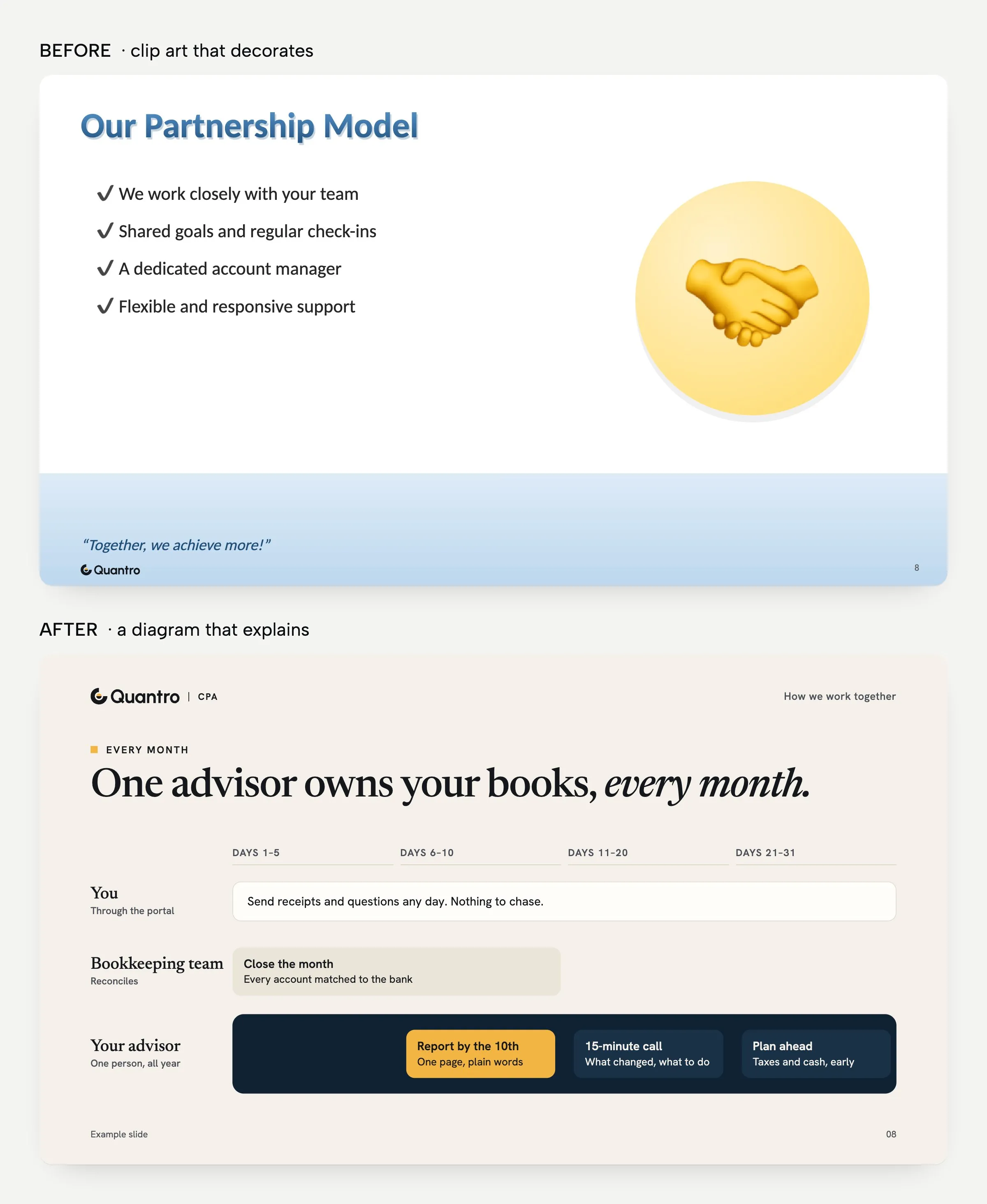
The two slides above say the same thing about the same service. The first uses clip art that decorates: it fills half the slide and tells you nothing you didn’t already know. The second uses a diagram that explains: it shows who does what, when in the month, and who is responsible. Both slides have a picture. Only one of the pictures does any work.
What to do: for each image in your deck, ask what it explains. If the honest answer is “nothing, it looks nice,” replace it with a diagram, a chart or white space. Keep photos for when the photo is the evidence: the product, the place, the team, the result.
The title carries the message
Look at a typical slide and its title is a label: “Market,” “Q3 results,” “Our approach.” Under it sits a list of bullets, and the actual point is somewhere in the list, or only in the presenter’s head. A different approach, called assertion-evidence, uses the title to state the point as a full sentence, and fills the slide with the visual evidence that proves it.
This has been tested. In a 2013 Penn State study by Garner and Alley, 110 engineering students watched the same technical presentation with one of two kinds of slides. One group saw common PowerPoint defaults: topic titles and bullets. The other saw sentence titles with visual evidence. The second group understood more, had fewer misconceptions, found the material easier to follow and remembered more on a later test.
An earlier classroom study points the same way. In a 2006 study by Alley and colleagues, a geoscience course with about 200 students per section was taught with either phrase headlines or sentence headlines. On the questions tied to those slides, students who saw sentence headlines averaged 79% correct; students who saw phrase headlines averaged 69%.
Research on charts adds to this. A Harvard team led by Michelle Borkin studied 393 visualizations and the eye movements of 33 people looking at them, then asked what they remembered. People spent the most time reading the text, especially the title, and the authors’ advice was direct: titles and supporting text “should convey the message of a visualization.”
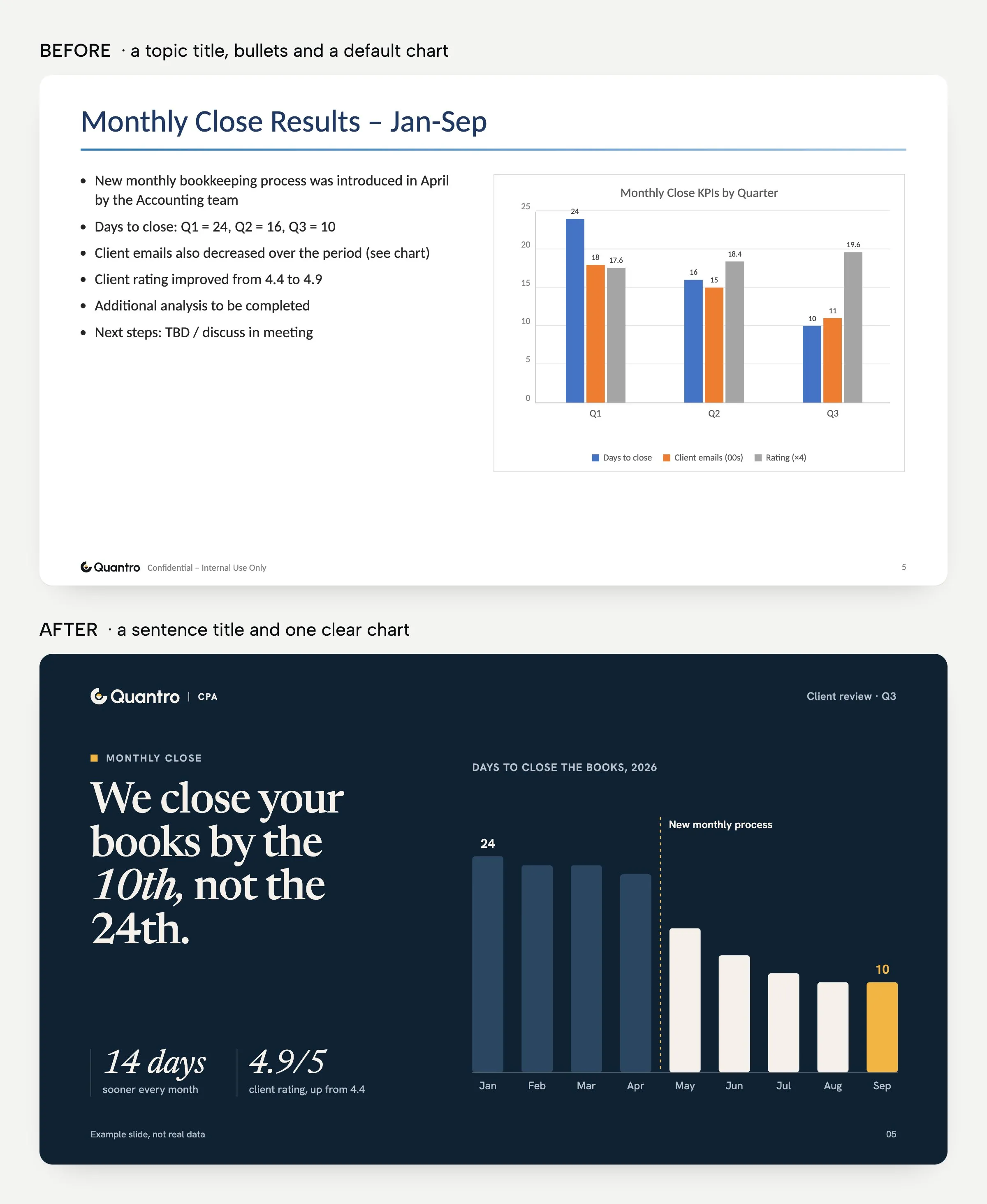
These studies have limits. Alley helped create the assertion-evidence approach, the samples are students, and each study covers one subject. The 2006 study also changed more than the headlines. Still, every result points the same way, and the change is easy to try.
What to do: rewrite every slide title as a sentence that states the takeaway, like the “after” slide above. Then read only the titles, in order. If the titles alone tell your story, the deck works for a reader in a hurry, and the rest of each slide can be the evidence.
Less time on slides, more conversation
So far the research has been about understanding. Sales data adds something different: what happens to deals.
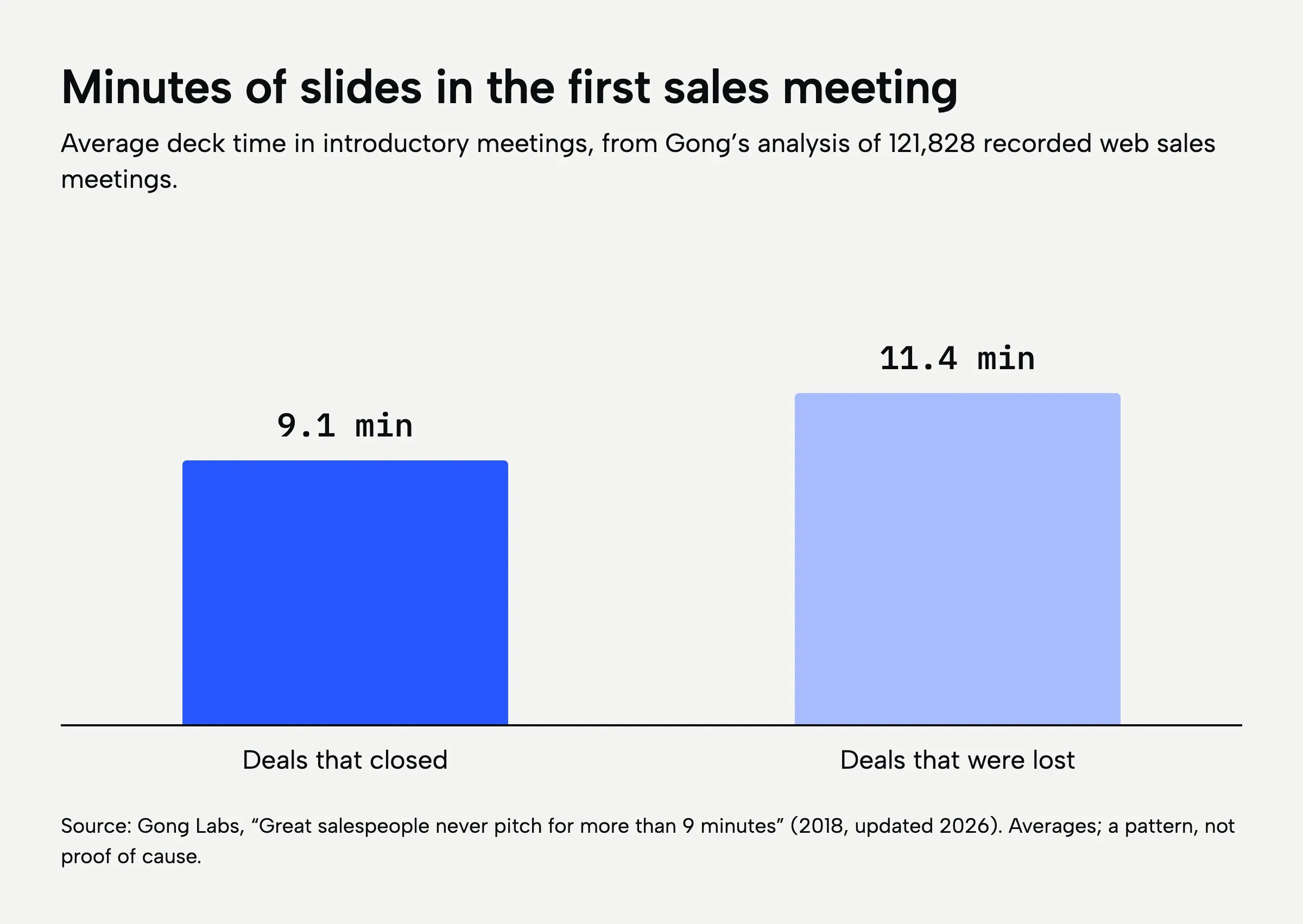
Gong records and analyzes sales calls for its customers, so it can see how decks are used in real meetings. In an analysis of 121,828 recorded web sales meetings, deals that closed used about 9.1 minutes of slides in the first meeting. Deals that were lost used about 11.4.
A second Gong analysis, of 803,402 recorded meetings, found that early discovery calls with slides were 17% less likely to lead to a follow-up meeting. With slides on screen, sellers asked 21% fewer questions, talked 15% more and spoke 25% longer without a break. In mid-stage and late-stage meetings, the effect flipped: slides helped.
This is data about what happened, not a controlled experiment, so it shows a pattern and not a cause. Better sellers may simply use fewer slides. But the pattern fits everything above. A deck that is short and clear leaves room for the buyer to talk, and the buyer talking is usually how a deal moves forward. A long deck turns a conversation into a lecture.
What to do: keep two versions. A short deck for first meetings, built to start a conversation, and a fuller one for later stages, when the buyer wants detail. If a slide doesn’t help the buyer decide something, move it to the appendix. You can still show it if someone asks.
Consistency builds trust
The same Gartner survey found something every brand team should notice: 69% of B2B buyers said what sellers told them didn’t match the information on the company’s website. When your deck uses different numbers, a different tone or a different look than your website, you add to that doubt at the exact moment you are asking for trust.
Consistency in a deck goes deeper than putting the logo in the corner and using the brand colors. It means slide titles written in your brand’s voice. It means charts that look the same every time, so a reader learns to read them once. It means the same facts and the same numbers in the deck, on the website and in the sales materials. And it means a closing slide that says clearly what happens next, in the same words your sales team uses.
For Forge Apollo’s pitch deck, that meant one icon set for every service and process step, and a black-and-blue system carried from the title slide through to the packages. Nothing in the deck looked borrowed from somewhere else, and that is what made it feel like one company talking.
Readability is part of consistency too. A slide with low-contrast text is hard to read at the back of a room and on a phone, and the people who struggle most are the ones you can least afford to lose. Web designers use a simple rule from the W3C’s accessibility guidelines: normal text should have a contrast ratio of at least 4.5 to 1 against its background. It is a web standard, but it is a good floor for slides. Microsoft’s own guide to accessible PowerPoint presentations covers the rest: alt text for images, a sensible reading order and a unique title on every slide.
What to do: build a master template with your layouts, chart styles and type, and keep your key facts in one shared place. Then every deck your team makes starts on brand and says the same thing your website says.
What the research doesn’t tell you
It is worth being clear about the limits. No study we found measures how many more deals a professionally designed deck wins. Be careful with any article that gives you that number. Some of the most widely shared statistics about presentations have no study behind them that we could trace, and we left them out.
What the research does show is narrower, and more useful. Most slides break the same few rules, and people don’t notice when they do. Decks are often read alone and fast. Diagrams help people understand, and decoration distracts them. Sentence titles carry the story. Less time on slides leaves more room for the buyer. And consistency with the rest of your brand builds trust. Good presentation design is the work of making all of that true for your deck.
You can do most of it yourself with the tools you already have. We design decks in PowerPoint, Keynote and Google Slides, and the tool is rarely the point. What matters is that each slide has one job and does it. If you would rather have help, our page on presentation design explains how we work, and our guide to what presentation design costs in 2026 compares every option with real prices.
For more on building the deck itself, read how to design presentations that close deals and how to design an investor pitch deck. When you are ready, tell us about your next presentation.