How to create a website for your business
A step-by-step guide for small business owners: decide what the site must do, gather your content, choose who builds it, plan the first screen, get found on Google and launch.

Most small business websites that don’t work have the same problem, and it isn’t the design. Nobody decided what the site was for. So it has a little of everything: a welcome message, a photo of the building, a paragraph about passion and quality, and a contact page at the end. Customers look at it for a few seconds, can’t find the one thing they came for, and call someone else.
This guide is for owners who want a website that pays for itself: more calls, more bookings, more requests for an estimate. We build websites for restaurants, salons, contractors and clinics, and the steps below are the same ones we follow with every client. They work whether you build the site yourself, hire a freelancer or hire us.
Everything starts with one question: what should the site do for you?
Start with one question: what should the site do for you?
Think of your website as a new employee with one job. A restaurant’s site has to fill tables or take orders. A salon’s site has to fill the appointment book. A contractor’s site has to bring in requests for an estimate. A clinic’s site has to book first visits. Everything else on the site, the photos, the story, the list of services, is there to help that one job happen.
Picking the job sounds obvious, but it changes almost every decision after it. It decides what goes on the first screen, which button is the biggest, what the headline says, how many pages you need and how you know the site is working.
It also matters more than it seems, because customers decide quickly. In a July 2026 BrightLocal study of 1,227 US consumers who had searched for a local business, 72% looked at three or fewer businesses before they chose, and 75% decided in less than 30 minutes. In another BrightLocal survey, 54% of people said they visit a business’s website after they read a good review of it. Your website gets one short look, at the moment someone is ready to choose. If it makes the next step obvious, you get the call.
| Business | The one job | What you count |
|---|---|---|
| Restaurant or café | Fill tables, or take the order | Reservations and online ordersCalls and taps on “Directions” |
| Salon, barber or spa | Fill the appointment book | Online bookingsNew clients each month |
| Contractor or home service | Bring in estimate requests | Estimate requestsCalls from your service area |
| Clinic or practice | Book first visits | New patient bookingsCalls from the site |
| Shop with a counter | Bring people to the store | Taps on “Directions”Customers who mention the site |

Once you know the job, write it down in one sentence, for example: “The site’s job is to get people in Fairview to ask us for a kitchen or bath estimate.” Put it somewhere you will see it. Every time you are not sure about a page, a photo or a paragraph, ask whether it helps that sentence. If it doesn’t, it can go.
The site also has a second job, and it is almost as valuable: answering the questions you get every day. What are your hours on Sunday? Do you take walk-ins? Is there parking? How much is a balayage? Do you work in my town? Every question the site answers is a phone call you don’t have to take while you’re busy with a customer, and a reason for a stranger to trust you before they call.
Finally, decide how you will count the job. You don’t need complicated analytics. A form that emails you, a booking tool that tells you where the booking came from, or simply asking new customers “How did you find us?” is enough. If the number goes up after launch, the site is working. If it doesn’t, you know where to look.
Gather what you already have
Most of what a good small business website needs, you already have. It is in your head, on your phone and in the questions your customers ask. Collecting it before anyone designs a page is the step that saves the most time and money, whoever builds the site.
It also covers most of what makes people pass on a business. When BrightLocal asked people why they didn’t contact a business they found online, the reasons a website can fix were near the top: unclear prices, missing or wrong information, no website at all and no photos.

The basics. Your business name exactly as you want it written, your address or your service area, your phone number, your hours (including holidays), and the email address customers should use. Write them once and use the same version everywhere: on the site, on Google, on Facebook and on Yelp. Search engines compare these details across sites, and small differences, like an old phone number on one of them, can make them less sure your business is what it says.
Your logo, if you have one. It doesn’t need to be perfect to launch a site. A clean file of the logo you use on your sign or your cards is enough. If you don’t have one, a well-set name in a good typeface works better than a rushed logo. You can always add a logo later.
Photos. Real photos of your work, your place and your people do more than any stock photo. In the same BrightLocal study, 18% of people said the best photos were one of the top three reasons they chose a business, and 16% skipped a business because its listing had no photos. You don’t need a photographer to start. A recent phone, daylight from a window, a clean background and a steady hand are enough. Take more than you need: the dining room before service, three of your best dishes from above, a finished kitchen remodel, your stylist at work, the front door so people recognize it. Hold the phone at the customer’s eye level, turn on the grid in your camera, and don’t use the zoom; walk closer instead. If you use stock photos at first, choose ones that could pass for your place, and replace them as soon as you can.
The words your customers use. This is the most valuable thing you can gather, and it’s free. For a week, write down every question customers ask you, on the phone, by text and at the counter. Write them in their words, not yours. “Do you do gutters?” “How long does a full set last?” “Can I bring my own wine?” Those questions are your website’s content: the headline, the services list, the FAQ and the words Google will match to their searches. People search the way they talk.
Your prices, or at least a range. Owners often worry that showing prices will scare people away. In our experience, the opposite is usually true: a range like “Kitchen remodels from $18,000” or “Cuts from $45” filters out people who were never going to buy and gives everyone else the confidence to call. If your work is truly custom, say how you price it and what affects the price.
Proof. Reviews from real customers, with their permission. Before-and-after photos. Licenses, certifications, years in business, the neighborhoods you serve. Facts persuade more than adjectives. “Licensed and insured in Arkansas, 14 years, 600 kitchens” beats “quality craftsmanship you can trust.”
Put all of it in one folder. If you hire someone, send them the folder. If you build it yourself, you now have everything you need to fill the pages, and that is most of the work.
Get your web address and email right
Your web address, the domain, is the one part of a website that is hard to change later. It’s printed on your truck, your cards and your menus, and it’s what Google knows you by. So it’s worth getting right the first time.
Pick a name people can say and spell. Short, no hyphens, no numbers unless they are part of your name, and easy to say over the phone. A .com is still the one people guess first. If your exact name is taken, add your town or your trade: mainstreetbakeryfairview.com or plumbandpineremodeling.com are fine. Before you buy, say it out loud to someone and ask them to type it. If they get it wrong, try another. A .com costs about $10 to $15 a year at most registrars, and the .com registry raises its fee on November 1, 2026. Watch for a cheap first year followed by a much higher renewal.
Register it in your own name. This is the most important rule in this guide. The domain should be registered to you or your business, with your email address, in an account you can log in to. ICANN, the organization that oversees domain names, puts the responsibility for a domain on its registrant: the person or company named on the registration. When a web designer or a marketing company registers it in their own account, you may find out years later that you can’t move your website, or that you have to pay them to get your own name back. If someone else set yours up, ask them to transfer it to your account now, while you’re on good terms.
Turn on automatic renewal, keep a card on file that won’t expire soon, and turn on two-step login for the account. Businesses lose their website, and their email with it, when a renewal notice goes to an old address and nobody sees it.
Use email at your domain. An address like hello@mainstreetbakery.com tells customers you’re a real business. It also keeps your business mail separate from your personal account, and it stays with the business if someone leaves. Google Workspace Business Starter and Microsoft 365 Business Basic both cost $7 per person per month on a yearly plan, or $84 a year. Some web designers and hosts include one mailbox; ask before you pay for it twice.
Choose who builds it, and on what
There are five common ways to get a small business website. None of them is right for everyone, and the honest answer depends on your time, your budget and how much you care about the result looking like your business. We compare their real prices, with sources, in our guide to what a small business website costs. Here is when each one fits.
Build it yourself on a website builder. Squarespace, Wix, GoDaddy and similar builders let you pick a template and fill it in. Squarespace starts at $19 a month billed yearly and Wix at $17.77 a month billed yearly, with business email extra. This fits if you have more time than money and you enjoy that kind of work. Plan for real hours: writing, taking photos, adjusting every page for phones and setting up Google. The usual risk is a site that looks like its template, because most people never change more than the colors.
Use the website that comes with your software. Booking apps for salons, ordering systems for restaurants and job software for contractors often include a simple website or booking page. It is a good choice if you use the software every day, and it is often the fastest way to take bookings online. The limits are design and control: every business on that platform looks alike, and if you change software, the site goes with it.
Hire a freelancer. A good freelancer can give you a custom site for a fair price. Quality varies more than anywhere else, from experienced designers to sellers who reuse one template for every client. Look at three sites they built for real businesses, on your phone, and ask who writes the words, who owns the domain and the site, and what changes cost after launch.
Hire a small studio. That’s what we are. A studio usually works from a fixed package, writes the words with you, designs the site for your business and sets up the technical parts. It costs more than doing it yourself and less than an agency. Ask the same questions you would ask a freelancer.
Hire an agency. An agency brings strategy, research, a team and a lot of pages. That’s the right call for a growing company with many services, locations or products. For a single restaurant or a two-chair salon, it is usually more than the job needs.
Whoever builds it, the platform matters less than three things: you can update the basics yourself (hours, prices, photos), you own the domain and can take the site with you, and you know the yearly cost after the first year. If you’re comparing the platforms designers use, our comparison of Framer, Webflow and WordPress goes deeper.
Plan the pages, starting with the first screen
Most small businesses need fewer pages than they think. A single, well-planned page can hold everything a new customer needs: what you do, why you, prices or a menu, reviews, hours, a map and the one big button. We build many sites that way, and for a café, a barber or a food truck it’s often the best choice.
Add pages when a single page would get too long to scan on a phone, or when a topic deserves its own search result. A contractor who does kitchens, baths and decks may want a page for each, because people search for each one separately. A restaurant with a long menu and private events may want both on their own pages. Five pages cover most small businesses: Home, Services (or Menu), About, Reviews or Gallery, and Contact.
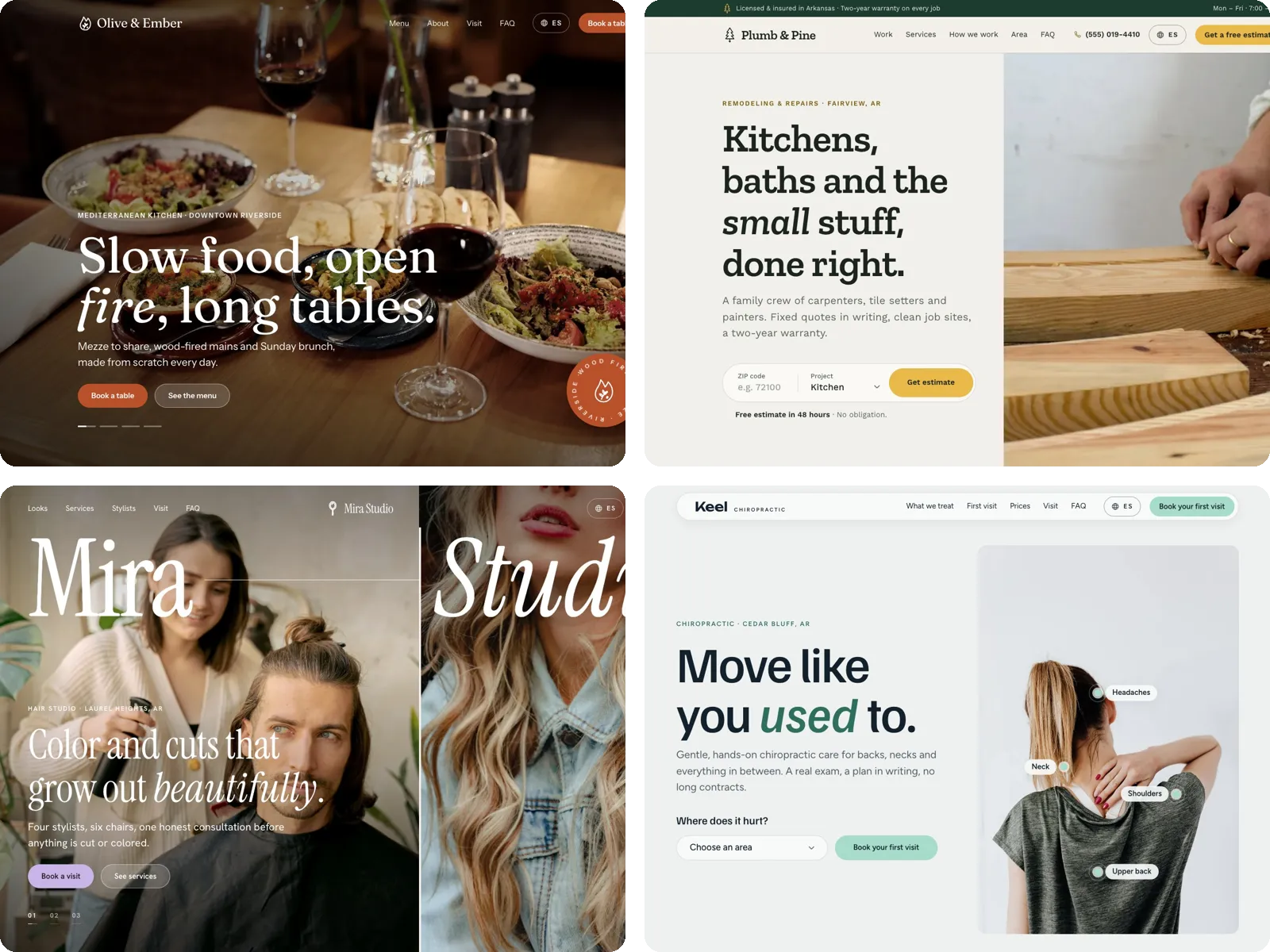
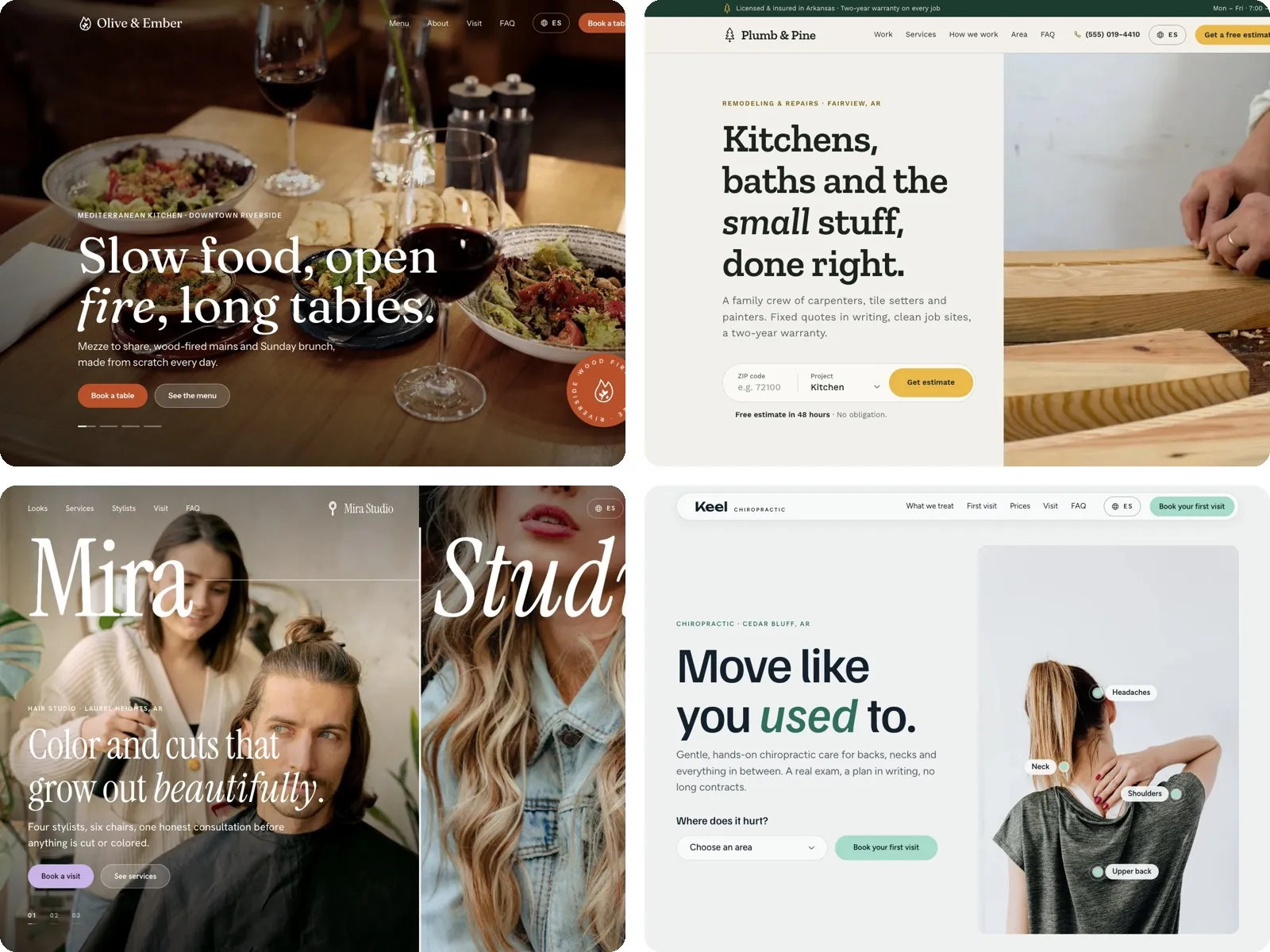
The first screen does most of the work. What a visitor sees on a phone before they scroll decides whether they stay. In those few seconds, it has to answer five questions: what you do and where, why you, why they can trust you, what to do now and what happens after they do it.

Notice what isn’t there: no “Welcome to our website,” no slideshow of five messages, no paragraph about passion. A visitor on a small phone sees what the business does, why it’s good at it and exactly what to do next. The rest of the page backs that up for anyone who wants more.
Write like you talk to a customer. Short sentences, everyday words, specifics. Use the questions you collected: if people ask “Do you work in Conway?”, the site should say “We work in Conway, Fairview and Greenbrier.” Put the most important fact first in every section. Cut words like “quality,” “passionate” and “solutions,” which every competitor uses and nobody believes. And read every page out loud once: if a sentence makes you stop, rewrite it.
Design for the phone first. In BrightLocal’s study, 73% of the most recent local searches started on a phone. Your visitors will hold the site in one hand, often on a slow connection, often while they’re doing something else. Make phone numbers tap to call and addresses tap to open in Maps. Keep buttons big and far enough apart for a thumb. Use text at least as large as the text in a text message. Put the main button where a thumb can reach it, and keep it on the screen as people scroll. Then look at every page on your own phone, not only on a computer.
Make it look like your business. Your site should feel like walking into your place. A warm, family restaurant and a modern cocktail bar can sell similar food and still need completely different colors, type and photos. If you use a template, change more than the colors: pick type that matches your sign, use your own photos, and remove sections you don’t need. Our post on choosing the right color palette for your brand is a good place to start.
Make it fast, easy to use and easy to find
A beautiful site that loads slowly, can’t be used by part of your customers or never shows up on Google can’t do its job. The good news is that the basics are well known, and most of them are free.
Speed. Google calls a page fast when its main content appears within 2.5 seconds and it reacts to a tap within 200 milliseconds. Many sites miss that: in the 2025 Web Almanac, only 48% of mobile websites passed all of Google’s speed checks. Local sites do worse: when we checked 324 Arkansas small-business websites in October 2026, only 3% scored “good” on Google’s phone speed test, and 35% had no phone number a customer can tap. The biggest cause of slow small business sites is photos: a 6 MB photo straight from a phone, used as a background. Resize photos to the size they appear, save them in a modern format like WebP, and don’t autoplay video on phones. Then test your site with Google’s free PageSpeed Insights, on the mobile tab.
Accessibility. An accessible site works for people who can’t see well, can’t use a mouse or use a screen reader, and it’s easier for everyone else too. Use text with strong contrast against its background, describe every meaningful photo in its alt text, make every button and form work with a keyboard, and never put important information only inside an image. It is also a legal risk in the US. Plaintiffs filed 3,117 website accessibility lawsuits in federal courts in 2025, up 27% from 2024, according to the law firm Seyfarth Shaw. Most target online stores, but food service is the second most sued industry, according to UsableNet. The usual target is WCAG 2.2 at level AA. Our post on designing for accessibility explains the basics.
Security. Your site’s address should start with https. Google has announced that Chrome will warn people before they open a public site that isn’t on https, by default, starting with Chrome 154 in October 2026. Almost every host and builder includes a free certificate now; make sure it renews by itself.
Google, step by step. Getting found locally has more to do with a few simple steps than with tricks.
- Give every page its own title and description. The title is the blue link people see in search results. Make it say what the page is and where: “Kitchen and bath remodeling in Fairview, AR | Plumb & Pine.” Google’s own starter guide asks for titles that are unique to the page, clear and short.
- Claim and complete your Google Business Profile. It’s free, and for a local business it is often more important than the website itself, because it’s what shows on Google Maps. Google says it ranks local results on relevance, distance and prominence, and that businesses with complete and accurate information are more likely to show up. Fill in every field, choose the right categories, add photos, keep your hours current, link it to your website and answer reviews.
- Add your business details in the format Google reads. Structured data for a local business tells search engines your name, address, phone, hours and the kind of business you are. Good builders and designers add it for you; ask.
- Connect Google Search Console. It’s Google’s free tool for website owners. Add your site, submit your sitemap and check it once a month: it shows which searches find you and warns you if Google can’t read a page.
AI search. More and more searches end on an AI summary at the top of the page instead of a click. In a 2025 Pew Research Center study, people who saw an AI summary on Google clicked a regular search result in 8% of visits, against 15% when there was no summary. And in BrightLocal’s 2026 survey, 45% of people said they had used ChatGPT or another AI tool to find a local business. Google says its AI features need nothing special from your site beyond what normal search needs. For a local business, the answer is not a trick; it’s clear facts. Pages that state your services, prices, hours, service area and reviews plainly, in text and not inside images, are easier for any search engine, and any AI, to understand and quote correctly.
The legal basics. If your site collects anything about visitors, like a contact form or a booking, it needs a privacy policy that says what you collect and why. California’s online privacy law, for example, requires a posted privacy policy on any commercial site that collects personal information from California residents, wherever the business is. If a form collects phone numbers to send marketing texts, federal rules require clear written consent. And marketing emails must follow the FTC’s CAN-SPAM rules: a real address, an honest subject line and an easy way to unsubscribe. This isn’t legal advice; if you’re unsure, ask your attorney.
Launch, then keep it alive
Before you tell anyone about the site, use it like a customer would, on your own phone.
- Open every page and tap every button and link.
- Call the number from the site. Open the address in Maps.
- Send yourself a message through every form, and make sure it arrives. Check your spam folder too.
- Book a test appointment or place a test order, then cancel it.
- Check your hours, prices and menu one more time.
- Look at it on a second phone, and on a computer, in more than one browser.
Then tell people. Add the link to your Google Business Profile, Facebook, Instagram, Yelp and your email signature. Put it on your receipts, your cards and your truck. Print a small QR code for the counter or the menu. Ask your best customers to leave a review.
A website is never finished. The sites that keep working are the ones somebody looks after. Fifteen minutes a month is enough for most small businesses:
- Update hours for holidays and seasons before they happen.
- Add a few new photos of recent work.
- Answer new reviews and add the best ones to the site, with permission.
- Look at Search Console: which searches found you, and did anything break?
- Check the job you wrote down at the start. Are calls, bookings or estimate requests going up?
Plan a bigger refresh every two or three years, or sooner if your business changes: a new location, new services, new prices or a new look. Small changes along the way cost far less than starting over.
If you would rather have it done for you. Everything above is doable on your own, and many owners do it well. If you would rather spend that time with customers, it’s exactly what we do. We design and build small business websites at two fixed prices: a landing page for $750, live in three business days, or a full website of up to five pages for $999, live in seven. Both include the design, the writing, the setup for Google, an email address at your domain and the first year of hosting.
You bring the business and a few things you like. We start with the same question this guide starts with, and build the site around the answer. You can see our sample sites, or, if you already have a site, run a free website check first to see how it does on phones and on Google.