Why responsive design is easier than ever
Why responsive web design matters, what usually breaks on phones and tablets, and how tools like Framer and fluid type make it easier to get right.

People visit your website from a desktop at work, a phone on the go and a tablet on the couch, often in the same week. Responsive design, where one site adapts its layout to every screen size, isn’t a nice-to-have anymore. It’s the baseline for a smooth, usable experience.
The challenge with traditional responsiveness
Many teams still struggle to get it right. A layout that looks balanced on a laptop can feel broken on a phone: elements shift, text shrinks until it’s hard to read, and buttons become hard to tap. Fixing it used to mean hand-coding separate rules for each breakpoint and a lot of back-and-forth between design and development.
Why it’s easier now
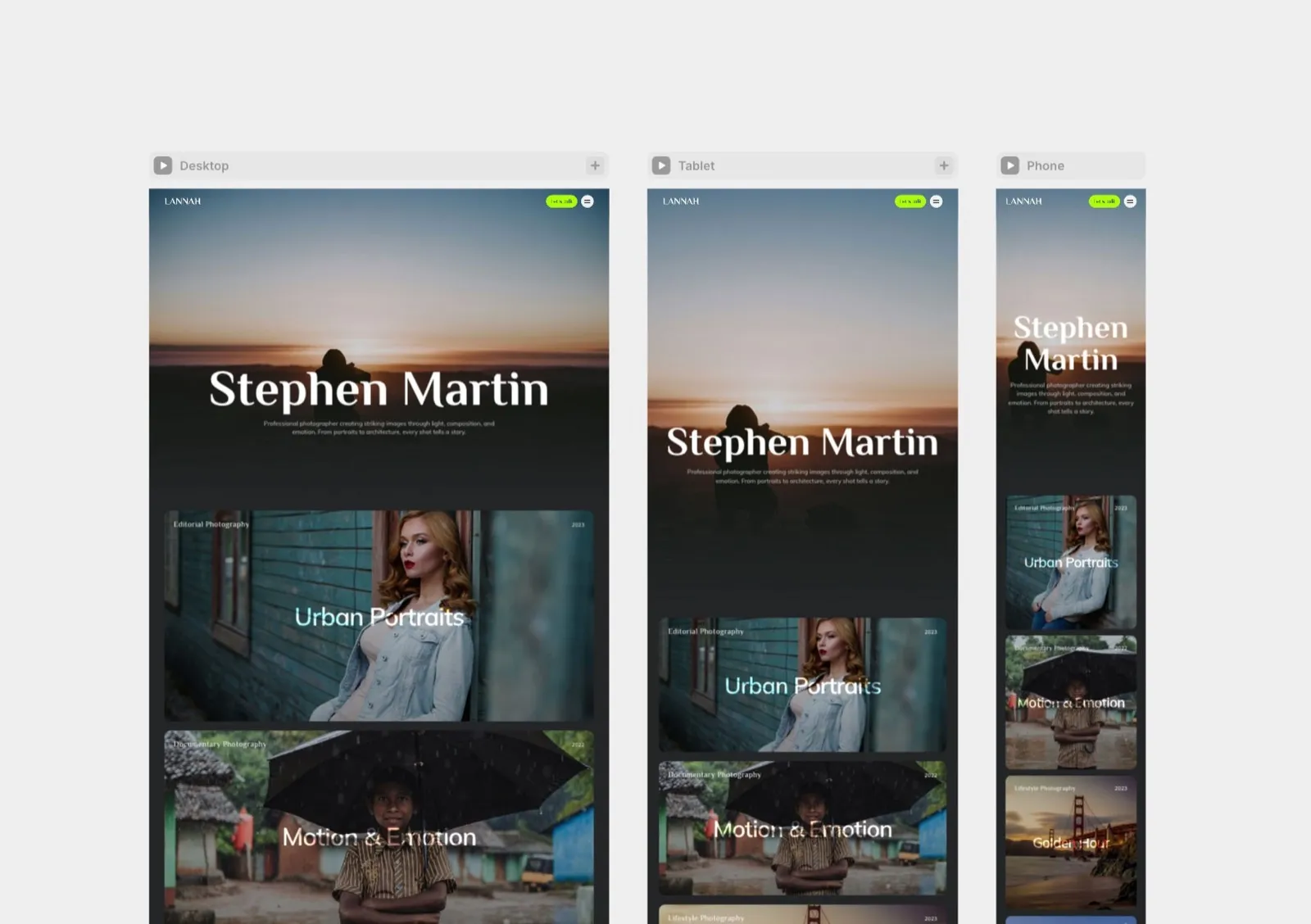
Two things changed. First, visual builders such as Framer and Webflow let designers set up and preview each breakpoint directly on the canvas, so the phone and tablet layouts get designed instead of left to chance. That’s how we designed and built Lannah, our concept portfolio template for photographers, shown below at three sizes in Framer.
Second, CSS itself has improved. Type and spacing can now scale smoothly between a phone and a wide desktop instead of jumping at fixed breakpoints, and components can adapt to the space they actually have. On our own site, every type size scales this way.
That matters more as screens keep multiplying. Foldable phones, now including Apple’s iPhone Duo, can switch from a phone-sized screen to a small tablet in the middle of a visit, so layouts should respond to the space they have, not to a fixed list of device sizes.
What to check on every screen
- Readable type: body text that stays at a comfortable size on phones, and headlines that don’t overflow.
- Tap targets: buttons and links big enough to hit with a thumb, with space between them.
- Images: sized and cropped for each screen, so phones don’t download desktop-sized files.
- Navigation: a menu that’s easy to open and close with one hand.
- Content order: the most important message still comes first when columns stack.
- Zoom: the page still works when someone enlarges the text, an accessibility basic that a flexible layout makes much easier.
Not sure how your own site does on a phone? Our free website check opens it the way a phone does and shows what to fix first.
Beyond the website
The same thinking applies to campaign graphics. One idea often has to work as a LinkedIn post, a display ad and an email header, and each size needs its own layout, not a stretched copy. That’s a big part of our digital and social design work.
Final thoughts
Responsive design doesn’t have to be frustrating or slow. With modern tools and a clear plan for each screen size, a site that works everywhere is easier to build than ever. It’s why we design every small business website for the phone first: that’s where many customers will see it. If you’re still choosing a platform, our comparison of Framer, Webflow and WordPress can help.