Boost your brand with stunning social media design
Social media design tips that work: consistent branding, strong images, readable type, layouts sized for each platform, plus useful tools and trends.
Social media design is a core part of modern marketing. The visuals on your profiles, posts and ads shape how people see your brand before they read a word. Here are the strategies and practices we use to create social content that’s clear, consistent and effective.
Understanding social media design
What is social media design?
Social media design is the process of creating visual content for social platforms: profile images and cover photos, organic posts, carousels and paid ads. Good social design grabs attention and gets your brand’s message across clearly and consistently.
Why is social media design important?
It helps you stand out in a crowded feed. Consistent, high-quality visuals build recognition and trust and encourage engagement. As people scroll, your design has only a moment to make them stop and want to learn more.
Your profiles and posts are often the first contact between your business and a potential customer, so they set expectations for everything that follows.
Key elements of social media design
Successful social media design comes down to a few elements: color, typography, imagery and layout. Each one plays a role in a presence that looks cohesive.
Best practices for social media design
1. Consistent branding
Keep your branding consistent across every channel. Use the same color palette, fonts and logo treatment so people recognize your posts wherever they see them. A set of templates helps a busy team stay on brand.
2. High-quality images
Always use high-quality images. Blurry or pixelated visuals make a brand look careless. Invest in good photography, or choose high-resolution stock images that fit your brand.
3. Effective use of typography
Typography is a powerful tool in social media design. Choose fonts that reflect your brand’s personality and are easy to read at phone size, and limit each design to one or two fonts to keep it clean.
4. Engaging layouts
Use white space to avoid clutter and make the content easy to digest. Balance text and images, and keep the message short enough to read at a glance.
5. Mobile optimization
Most people scroll social media on their phones, so design for small screens first. Check that text is legible on a phone and that nothing important sits where the platform’s interface covers it.
6. Platform-specific sizes
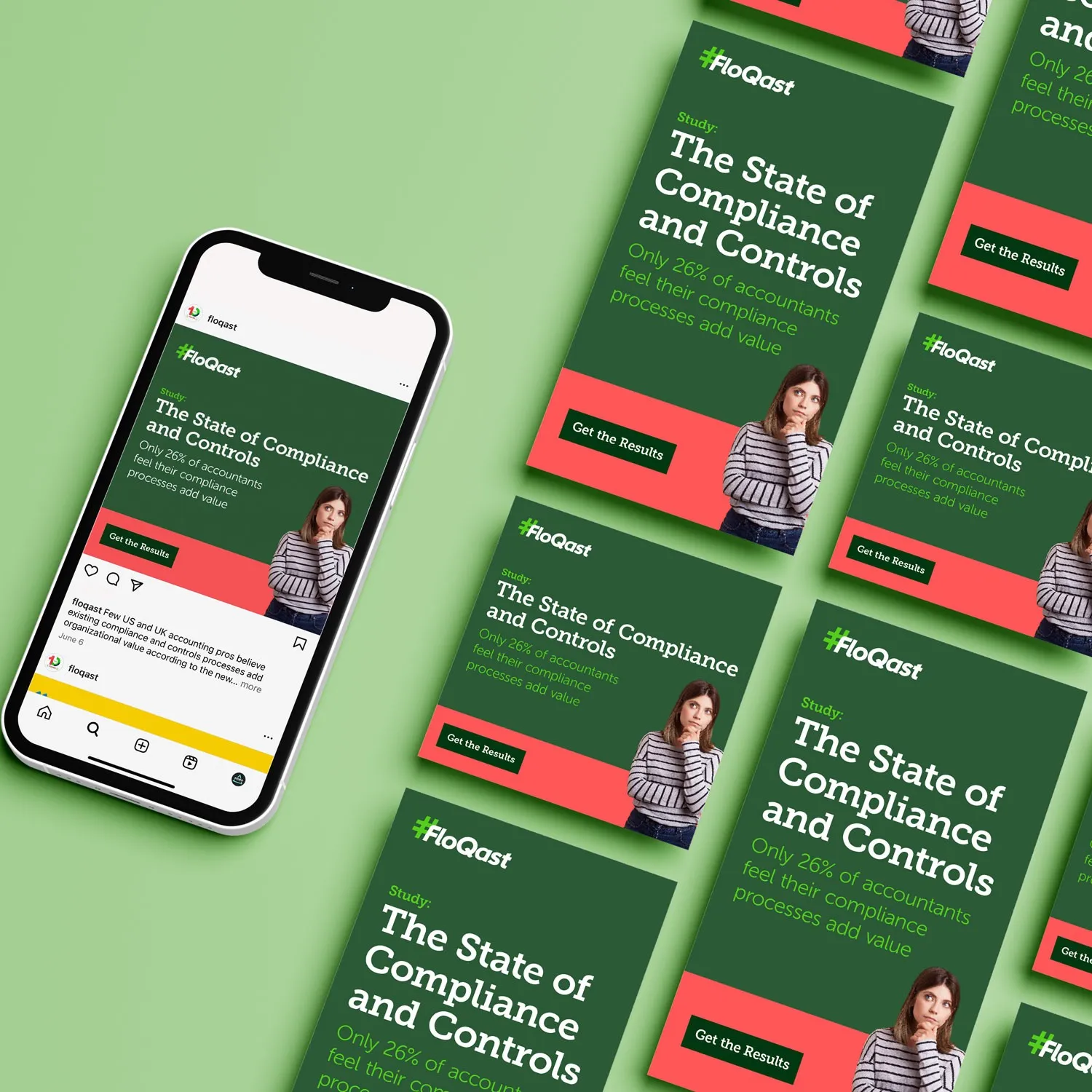
Each platform has its own formats and crops. A campaign usually needs the same idea in several sizes: square and portrait posts, stories, carousels and display banners. Check each platform’s current specs before you design, because they change. Instagram, for example, now shows posts in a taller 3:4 profile grid, so text near the top or bottom of a portrait post can be cropped out of the grid view. For FloQast’s compliance report campaign, we designed matching organic and paid social ads so the campaign looked the same in every feed.
Tools for creating social media designs
Graphic design software
Adobe Photoshop, Illustrator, Figma and Canva are the standard tools for social media design. They offer a wide range of features, and templates that help teams produce consistent visuals quickly.
Stock image websites
Unsplash, Pexels, Adobe Stock, Freepik and Shutterstock offer high-quality images to complement your content. Check each site’s license before you use an image in paid ads.
Design inspiration platforms
Dribbble and Behance are good places to find design inspiration. Browse other designers’ work for ideas, then adapt them to your own brand.
Trends in social media design
Minimalist design
Clean, simple visuals with plenty of white space still stand out in busy feeds and make a brand look modern.
Bold typography
Bold, eye-catching typography conveys a message quickly, which matters when people are scrolling fast.
Motion and video
Short animations and video catch the eye in a feed. Even a simple animated version of a static post can help it stand out.
Carousels and interactive content
Carousels let you tell a short story one slide at a time. On LinkedIn they’re posted as multi-page PDF documents, and on Instagram as swipeable posts. Polls and quizzes invite people to respond. The LinkedIn carousels we designed for LexCheck cover fast redlines, spotting issues and analytics, one idea per slide.
Social media design is central to a strong online presence. Follow these practices, keep an eye on what’s changing and your visuals will make your brand easier to recognize and remember. We design organic posts, paid ad sets and carousels as part of our digital and social work. If you have a campaign coming up, tell us about it.