Graphic design: what it is, why it matters, and how I built my freelance career
What graphic design involves, why it matters to businesses, and what I learned building a freelance design career without an expensive design degree.
When I tell people I’m a freelance graphic designer, I often get puzzled looks. People have a rough idea of what I do, but few see the full picture, or how it’s possible to earn a good living this way.
In this post I’ll explain what graphic design involves, why it matters to businesses, and share practical advice from my own path to a freelance career, without the burden of an expensive design school.
I’ve been designing since 2005, starting at a sign and print shop and then a marketing agency in Puerto Rico. I founded Xiobo Creative in 2012, worked as a freelance senior designer for DataStax from January 2017 to February 2021, and from 2021 designed presentations for Salesforce, Google and Apple through Duarte. I’ve also worked directly with Nasdaq and designed for B2B and SaaS teams such as FloQast and Dentsply Sirona, and today Ingrid Altreche and I run Xiobo Creative as a two-person design studio. Trust me: if I can do it, you can too.
What exactly is graphic design?
Graphic design is visual communication: using type, images, color and layout to deliver a clear message. It covers many areas, including:
- Branding and logos
- Marketing collateral (brochures, flyers, datasheets, ads)
- Social media and digital graphics
- Web design and user interfaces
- Packaging and print design
At its core, graphic design isn’t about making things pretty. It’s about communicating clearly and with purpose.
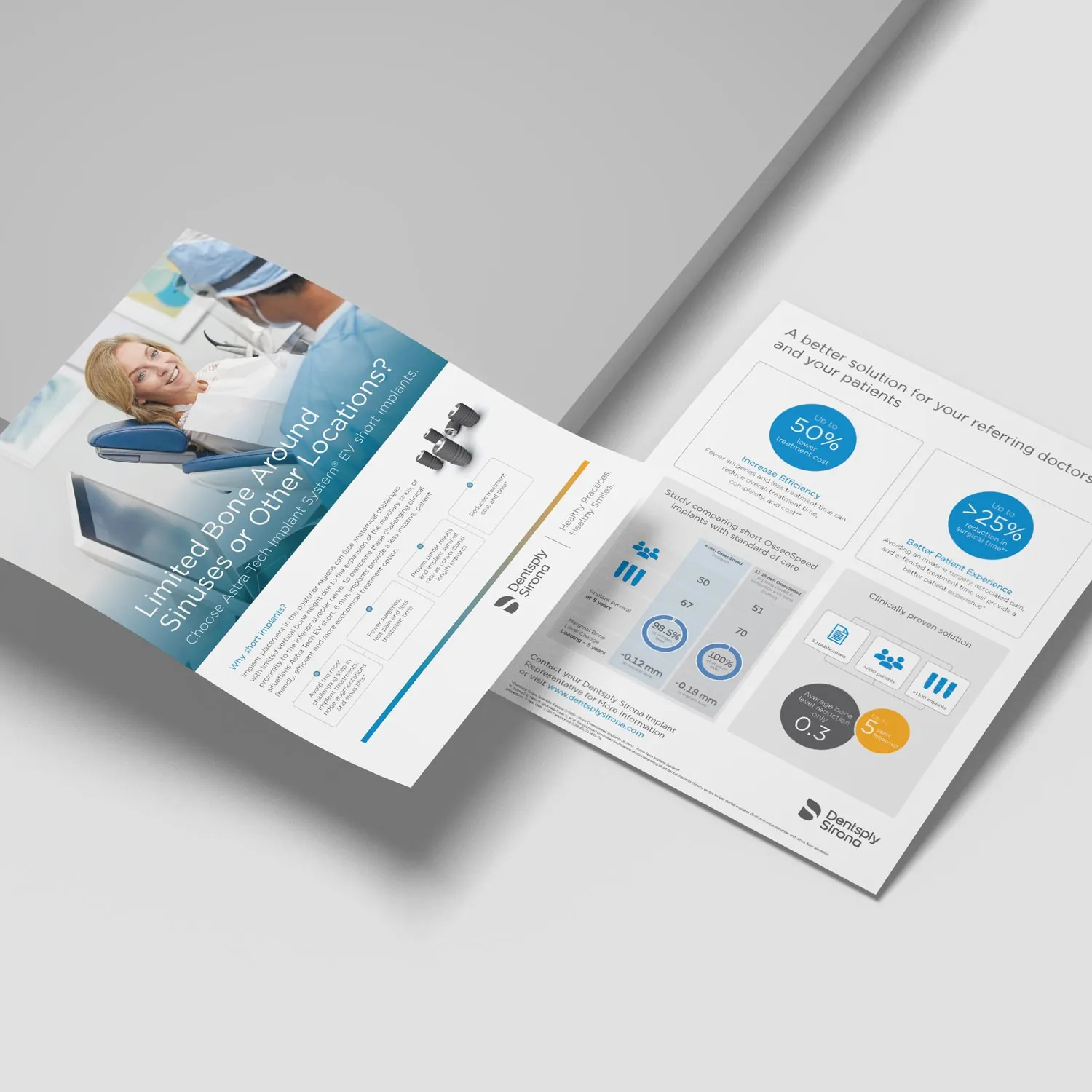
A two-sided referral flyer from our design work for Dentsply Sirona.
Why graphic design matters today
Professional design shapes how people perceive a business or brand. Here’s why it matters:
- Strong first impressions: good design earns attention quickly.
- Clear messaging: visuals make complex information easier to understand.
- Credibility and trust: professional, cohesive design makes a brand look reliable.
- Competitive advantage: strong visuals help you stand out in a crowded market.
Good graphic design helps businesses grow, and there’s more on that in our post on the power of professional design for your business.
Can you really make a good living as a freelance graphic designer?
Yes. One of the biggest misconceptions about freelance design is that it’s unstable or low-paying. I’ve built a comfortable, sustainable freelance career: I set my own rates, choose my projects and make a living comparable to many corporate roles.
Here’s a quick comparison:
| Aspect | Freelance designer | Agency designer |
|---|---|---|
| Flexibility | You decide how and when you work | Set by the agency |
| Income | You set your rates | Fixed salary |
| Project choice | You choose your clients | Projects are assigned |
| Stability | You find your own work | A steady paycheck |
| Career growth | As fast as you push it | Structured, often slower |
The catch: to make it work, you have to commit to constant learning and growth.
Do you really need an expensive design school?
Not necessarily. A formal degree can be valuable, but it’s expensive: a four-year program can cost tens of thousands of dollars, depending on the school and where you live.
Online courses: a more affordable path
Today there are high-quality, affordable online options. Here’s how they compare:
| Education type | Cost | Flexibility | Practical skills | Industry-ready? |
|---|---|---|---|---|
| University (4-year) | High | Low | Often theoretical | Depends on the school |
| Online courses | Low | High | Very practical | Yes, if well chosen |
Online courses I recommend
- Flux Academy: excellent for web design, and it also teaches core graphic design and branding skills.
- LinkedIn Learning: a huge library of graphic design, branding and software courses.
With online courses, your results depend on your own effort and consistency.
You don’t need expensive gear.
Essential tools: you don’t need expensive equipment
Starting a freelance design career doesn’t require high-end equipment. At first you just need two things.
A computer (desktop or laptop)
You don’t need a top-of-the-line machine to start. Even a budget Windows PC can do the job, although it might slow you down a little. Personally, I’ve tried Windows many times, but I find Macs more reliable and less hassle.
My recommendation: the Mac mini. It’s an affordable, powerful starter machine that will serve you well for years.
Design software
You’ll need professional software:
- Adobe Creative Cloud (the industry standard, paid monthly)
- Affinity (now free from Canva; one app for vector, photo and layout work)
- Figma (free to start; best for web, UI and social graphics)
- Canva (free to start; good for quick graphics but limited as a primary tool)
Use the right tool for the job
Choosing the right software has a big effect on speed and quality:
| Task | Best tool | Good alternative |
|---|---|---|
| Corporate and text-heavy designs | Adobe InDesign | Affinity |
| Illustration, logos, banners | Adobe Illustrator | Affinity |
| Photo editing, image-heavy posters | Adobe Photoshop | Affinity |
| Social graphics, web and app design | Figma (best choice) | Canva (limited) |
| Websites (final build) | Framer | Webflow (powerful, more complex) |
A few notes from experience:
- Photoshop: mainly for photo editing and image-heavy designs; limited for text-heavy work.
- InDesign: ideal for corporate, text-heavy designs such as brochures, annual reports and books.
- Illustrator: great for vector illustrations, logos and banners; inefficient for corporate documents or social graphics.
- Figma: excellent for social, web and app design thanks to its auto layout features.
- Framer: a natural next step once you’ve mastered Figma, if you want to design and publish websites yourself.
Using the right software saves time, money and frustration.
My personal tips for aspiring graphic designers
These practical habits helped me build my freelance career:
- Build a strong portfolio. Quality projects attract better clients.
- Always learn and grow. Keep updating your skills.
- Network constantly. LinkedIn, Instagram, Behance and Upwork are all great places to be seen.
- Specialize. A niche makes you more valuable and sought after.
- Never undervalue your skills. Pricing too low makes it hard to raise your rates later. Clients who start at a low rate often refuse to pay more, even when you’re worth it, yet they’ll often pay a higher price to another designer later. It’s a strange mental block. Set competitive rates from the start.
Encouragement from someone who’s done it
My freelance career wasn’t built overnight. It took effort, persistence and a refusal to quit when things got tough. Ignore anyone who doubts that graphic design is a “real career”. It’s real, rewarding and achievable.
With dedication, you can build a successful freelance graphic design career. I’ve done it, and so can you.
Final thoughts
Graphic design isn’t just about creating pretty visuals. It’s strategic communication that brands rely on every day. If you’re committed and keep learning, freelance graphic design can be a fulfilling, profitable career.
At Xiobo Creative, graphic design has given me the freedom and satisfaction I always wanted. If you put in the work, it can do the same for you. You can see the kind of work it’s led to in our case studies.